API Scan Trigger
Trigger an AuditAgent scan programmatically. Upload a ZIP of your repository and a JSON payload that points at the contracts in scope, and AuditAgent returns a scan_id you use to fetch results.
The same flow works for Solidity (.sol), Cairo (.cairo), and Rust source files for Solana. See Which ecosystems we support for the per-language details.
For the full, interactive API reference (every endpoint, schema, and request/response model), see the live API documentation.
Before you start
A few things should be ready.
- A plan that supports API access. See Subscription Plans for the per-plan breakdown.
- An API key generated from your AuditAgent dashboard. Step 1 walks through it.
- A ZIP of your repository, with the contract files in scope and any documentation included.
The JavaScript examples assume Node 18 or newer with ESM enabled ("type": "module" in package.json or a .mjs file). The Python examples use requests (pip install requests).
Step-by-step guide
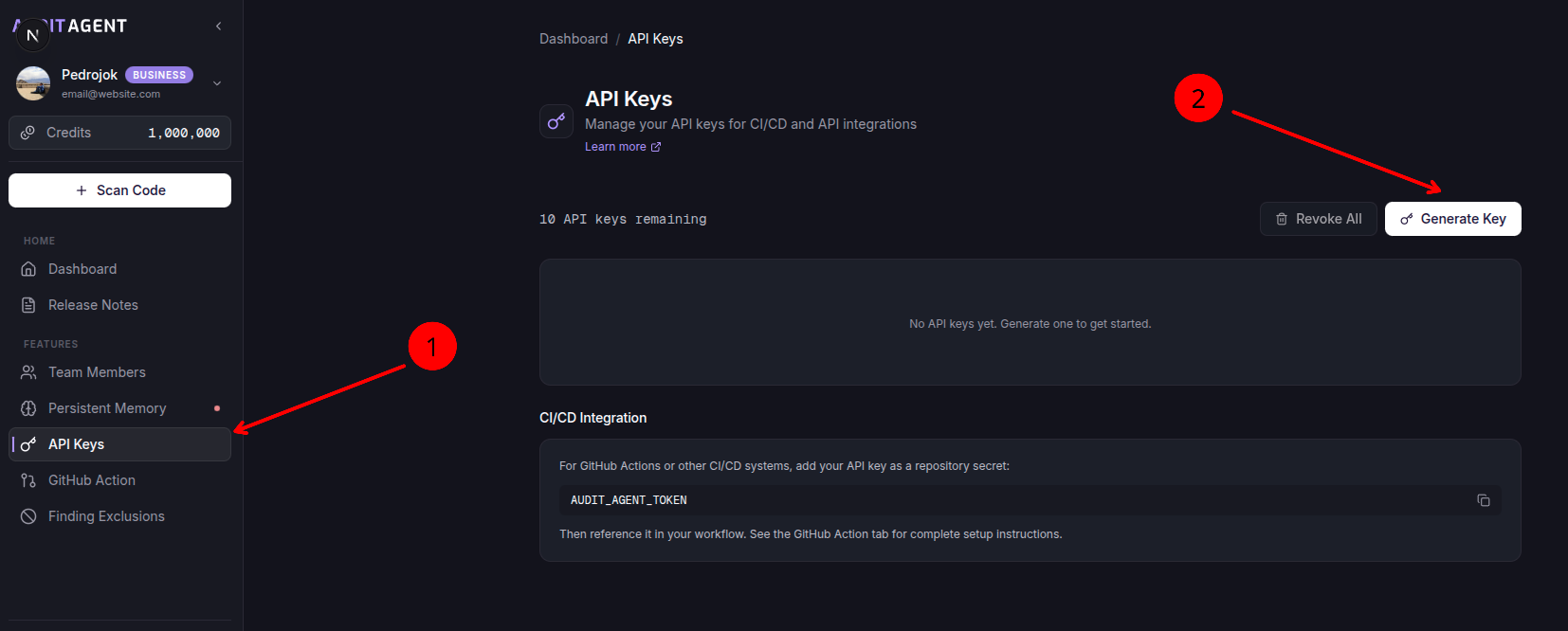
1. Set up an API key
- Open your profile by clicking on your user icon.
- Select the API Keys tab.
- Click Generate Key.
- Save the key immediately. It will only be shown once.
2. Prepare your repository ZIP
- Create a ZIP archive of your project.
- Include the contract files and any documentation, such as README.
- Note the relative paths of your contract files from the ZIP root.
Each scan caps at 100 contracts and 20,000 BLoC, the same limits as the dashboard flow.
3. Build your request payload
The payload is a JSON string with the following fields. If you omit scanQuality, the API runs a scan at $0.05 per BLoC.
developerScandeveloperScan was removed and is now rejected with a 422. It is not silently upgraded, so an integration that sends it is never charged the higher rate by surprise. Omit scanQuality, or send auditorScan.
| Field | Type | Required | Default | Description |
|---|---|---|---|---|
contracts_in_scope | string[] | Yes | none | Paths to contract files relative to the ZIP root |
docs | string[] | Yes | none | Paths to documentation files (e.g. README) inside the ZIP |
scanQuality | string | No | auditorScan | auditorScan only; developerScan returns 422. See Scan. |
project_name | string | No | ZIP filename | Display name for the project in the dashboard |
findings_format | string | No | pdf_and_json | pdf, json, or pdf_and_json |
Each file in contracts_in_scope must be a separate array element.
"contracts_in_scope": ["src/Token.sol", "src/Vault.sol"]
4. Trigger the scan
Send a multipart/form-data request with your API key, payload, and ZIP file.
- cURL
- JavaScript
- Python
curl -X POST https://api.auditagent.nethermind.io/api/v1/scanner/direct/scan-repo-zip \
  -H "X-API-Key: YOUR_API_KEY" \
  -F 'payload={
    "contracts_in_scope": [
      "src/Token.sol",
      "src/Vault.sol"
    ],
    "docs": ["README.md"],
    "scanQuality": "auditorScan",
    "project_name": "MyProject"
  }' \
  -F 'repo_zip=@/path/to/your/project.zip'
import fs from 'node:fs';

const payload = {
  contracts_in_scope: ['src/Token.sol', 'src/Vault.sol'],
  docs: ['README.md'],
  scanQuality: 'auditorScan',
  project_name: 'MyProject',
};

const form = new FormData();
form.append('payload', JSON.stringify(payload));
form.append('repo_zip', new Blob([fs.readFileSync('./project.zip')], { type: 'application/zip' }), 'project.zip');

const res = await fetch('https://api.auditagent.nethermind.io/api/v1/scanner/direct/scan-repo-zip', {
  method: 'POST',
  headers: { 'X-API-Key': 'YOUR_API_KEY' },
  body: form,
});

const { data } = await res.json();
console.log(data.scan_id);
import json
import requests

payload = {
    "contracts_in_scope": ["src/Token.sol", "src/Vault.sol"],
    "docs": ["README.md"],
    "scanQuality": "auditorScan",
    "project_name": "MyProject",
}

with open("./project.zip", "rb") as zip_file:
    response = requests.post(
        "https://api.auditagent.nethermind.io/api/v1/scanner/direct/scan-repo-zip",
        headers={"X-API-Key": "YOUR_API_KEY"},
        data={"payload": json.dumps(payload)},
        files={"repo_zip": ("project.zip", zip_file, "application/zip")},
    )

scan_id = response.json()["data"]["scan_id"]
print(scan_id)
A successful response returns a scan_id.
{
  "success": true,
  "data": {
    "scan_id": "1a2b3c4d-e5f6-7890-abcd-ef1234567890"
  }
}
Save the scan_id (a UUID v4). You will need it to retrieve results.
5. Retrieve results
Once the scan completes, results are available three ways.
From the dashboard. Completed scans appear automatically under the relevant project.
JSON results via API.
Each finding's description is a Markdown string that includes its available narrative sections and supporting source excerpts. Emailed JSON reports, dashboard JSON downloads, and MCP results use the same string shape. Recommendations are omitted. See finding details for more information.
- cURL
- JavaScript
- Python
curl https://api.auditagent.nethermind.io/api/v1/scanner/direct/result/json/YOUR_SCAN_ID \
  -H "X-API-Key: YOUR_API_KEY"
const res = await fetch('https://api.auditagent.nethermind.io/api/v1/scanner/direct/result/json/YOUR_SCAN_ID', {
  headers: { 'X-API-Key': 'YOUR_API_KEY' },
});

const findings = await res.json();
console.log(findings);
import requests

response = requests.get(
    "https://api.auditagent.nethermind.io/api/v1/scanner/direct/result/json/YOUR_SCAN_ID",
    headers={"X-API-Key": "YOUR_API_KEY"},
)

findings = response.json()
print(findings)
PDF report via API.
- cURL
- JavaScript
- Python
curl https://api.auditagent.nethermind.io/api/v1/scanner/direct/result/pdf/YOUR_SCAN_ID \
  -H "X-API-Key: YOUR_API_KEY" \
  --output report.pdf
import fs from 'node:fs';

const res = await fetch('https://api.auditagent.nethermind.io/api/v1/scanner/direct/result/pdf/YOUR_SCAN_ID', {
  headers: { 'X-API-Key': 'YOUR_API_KEY' },
});

const buffer = Buffer.from(await res.arrayBuffer());
fs.writeFileSync('report.pdf', buffer);
import requests

response = requests.get(
    "https://api.auditagent.nethermind.io/api/v1/scanner/direct/result/pdf/YOUR_SCAN_ID",
    headers={"X-API-Key": "YOUR_API_KEY"},
)

with open("report.pdf", "wb") as f:
    f.write(response.content)
You also receive an email with the findings attached in the format set by findings_format (PDF, JSON, or both).
A scan triggered without enough credits returns HTTP 402 Payment Required and stays in the initialized state on the backend, so it does not appear in the dashboard. Top up your credits and re-trigger the scan via API.