How Your Security Scan Score is Calculated
Your AuditAgent score sits on a scale of 0 to 100, where 100 is the best possible score. It is driven by the most severe open finding in your scan, then by how many findings there are.
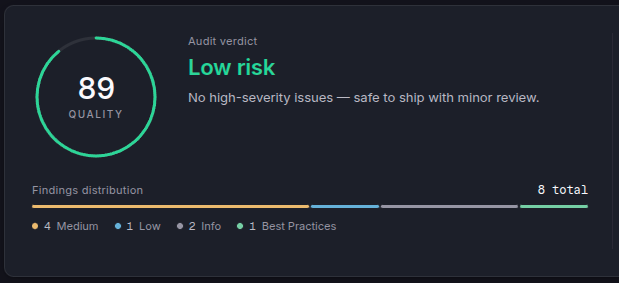
LLMs can hallucinate, and a false positive lowers the score like a real finding. Review every finding before acting on it, and exclude the ones that are false positives: excluding a finding updates the score straight away. When the score is below 100, the Overview tab shows a Review Findings button under the verdict that takes you to the findings list.
The worst open finding sets the range
| Most severe open finding | Score range |
|---|---|
| None (no open High, Medium or Low) | 100 |
| Low | 90 to 99 |
| Medium | 70 to 89 |
| High | 10 to 69 |
An open High always keeps the score between 10 and 69, however clean the rest of the code is. A single High with few other findings puts the scan at Moderate risk: it needs attention before deployment, but one unconfirmed finding is not treated as a failing scan. Several Highs take it to High risk. The score never drops below 10. Once the last High is fixed or excluded, the score moves up to the range of the next most severe finding.
More findings lower it within that range
The first finding of the top severity puts the score at the top of its range. Each additional one lowers it, with less effect every time, so the score approaches the bottom of the range without ever dropping below it. Findings of lower severity count for a small fraction of a finding.
| Open findings | Score |
|---|---|
| 1 Low | 99 |
| 10 Low | 90 |
| 1 Medium | 89 |
| 3 Medium | 79 |
| 1 High | 69 |
| 1 High, 2 Medium, 3 Low | 66 |
| 2 High | 58 |
| 5 High | 36 |
| 10 High | 19 |
The verdict
The Overview tab shows a verdict next to the score.
| Score | Verdict |
|---|---|
| 80 and above | Low risk |
| 60 to 79 | Moderate risk |
| Below 60 | High risk |
An open High can never reach Low risk: one High is usually Moderate risk, two or more are High risk. Mediums alone stay at Low risk up to two findings and move to Moderate risk from three, never further. Lows alone are always Low risk.
What does not count
- Excluded findings. A finding you exclude no longer affects the score, whatever reason you pick. Remove the exclusion and it counts again in the scan you excluded it from.
- Informational findings and best practices. They never change the score.
- Code size and comments. The score measures the risk in the findings, not how large or how documented the codebase is.
Things worth knowing
- Still experimental. The ranges and how quickly findings lower the score may be tuned as we learn from real scans. When that happens, existing scans are rescored automatically.
- Score is a benchmark, not the goal. AuditAgent exists to surface actionable issues. Treat the score as a fast signal, not the deliverable.
What changed
The score now follows the rules on this page, and existing scans were rescored automatically, so a past scan can show a different score than before. Scans with an open High now score lower than they used to. This is intentional: an open High should never look safe, so it keeps the score below 70 whatever the size or quality of the rest of the code. If a High turns out to be a false positive, exclude it and the score returns to the range of the next most severe finding.