Managing Your Project Memory
Once initialized, your project memory is a living knowledge base that you can view, edit, and refine. This page covers how to access and work with each section of your memory.
Accessing Memory
There are two ways to open a project's memory:
- From the dashboard: Click the brain icon on any scan card that has active memory
- From Features: Go to Features > Persistent Memory and click on any project in the list
A red dot on the brain icon indicates there are pending updates waiting for your review.
Memory Viewer
The memory viewer lists your memory's content categories in the left rail, each showing an item count. Click any category to view and manage its contents.
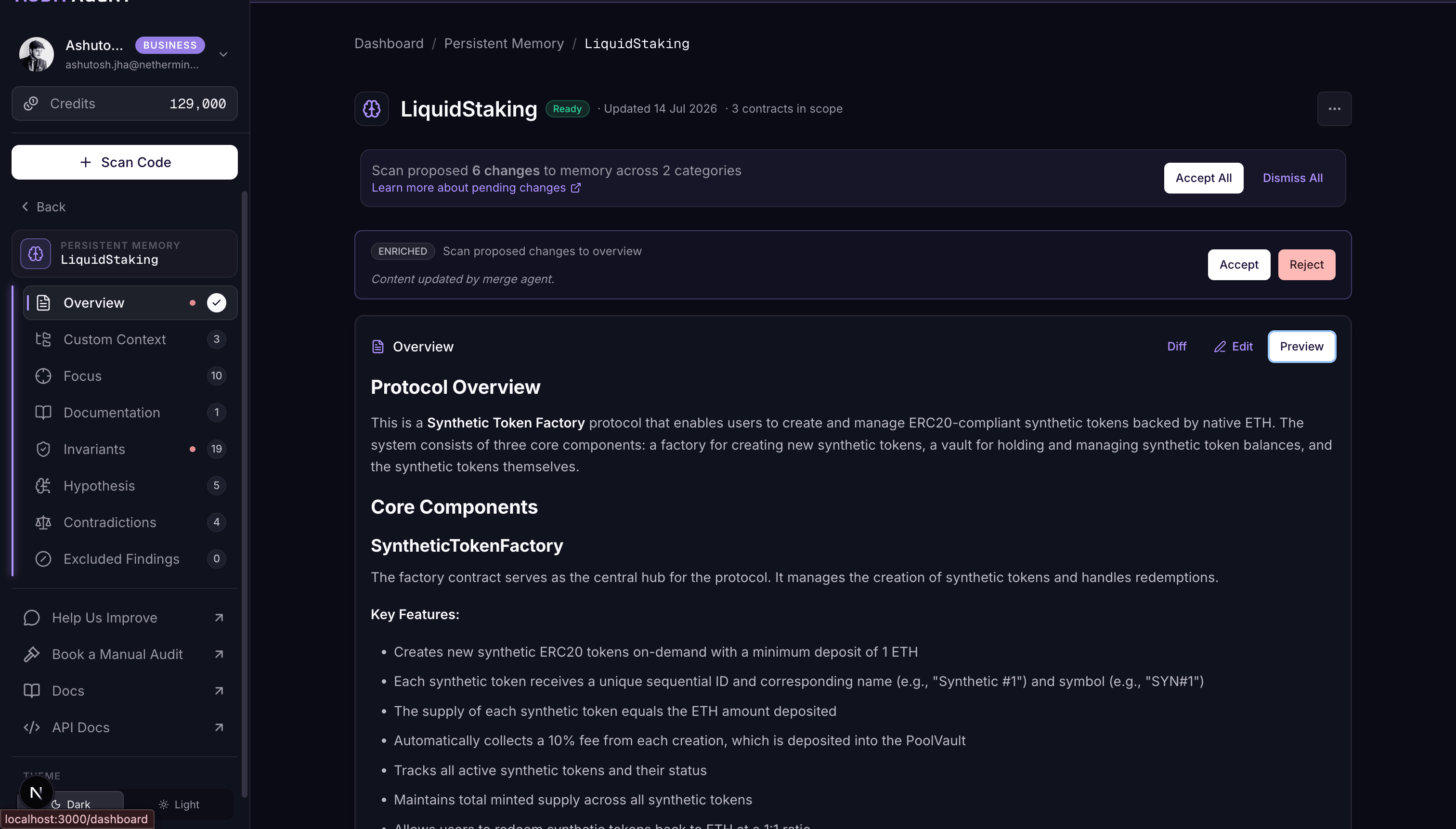
Overview
A high-level markdown summary of your project — its architecture, key components, dependencies, and assumptions.
- Editable: Toggle between Preview and Edit mode
- Format: Free-form markdown
- Use this to capture context that AuditAgent should know about your project's design and intent
Threat Modeling
Who can act maliciously, who will not, and which configuration values are feasible for your project.
- Fully editable: Add, edit, and remove actors, good actors, and configuration knobs
- Project-wide: One threat model for the whole project, not per contract
The editor has three parts:
- Actors: roles or parties that could act maliciously (e.g. unprivileged users, moderators)
- Good actors: roles you treat as non-malicious; findings that blame them may be filtered out
- Configurations: named knobs with allowed values (e.g. fee range, oracle count). Toggle Locked when the listed values are the only ones that can exist
New labels discovered during scans are proposed as pending changes.
Custom Context
A tree of Markdown notes, organized into folders, that captures project knowledge you want every scan to build on.
- Editable tree: Use New File and New Folder to build the structure, select a file to edit its Markdown in the panel, and rename or delete any node.
- Save to apply: Edits are staged locally as you work; click Save to persist the tree, or Cancel to discard unsaved changes.
- Scans contribute too: After each scan, AuditAgent proposes additions and edits to the tree as pending changes for you to accept or reject. Auto-generated write-ups for external dependencies also land here, under an
external_context/folder.
How it's used. At scan time the whole tree is used as context for scan for better understanding of the entire project
Custom Context is most valuable for context the code and READMEs don't make obvious:
- Subsystem or module overviews, and how the pieces fit together
- Trust assumptions, privileged roles, and who is allowed to do what
- How external integrations and dependencies are expected to behave
- Areas you consider high-risk and want every scan to weigh carefully
Documentation
Read-only view of the documentation ingested during initialization. This includes:
- Readme files from your repository
- Additional links you provided
- Additional documentation text
Documentation is provided during the scan stepper and cannot be edited directly from the memory viewer.
Invariants
Properties of your smart contracts that should always hold true. This is the most interactive section of your memory.
- Fully editable: Add, edit, and delete invariants per contract
- Per-contract organization: Invariants are grouped by contract, displayed in an expandable accordion
- Show all contracts: Toggle to reveal contracts in scope that don't have invariants yet, so you can add new ones
Each invariant card shows:
- A human-readable description of what the invariant means
- A condition — the formal statement that should never be violated
- The source (scan or user) and last updated timestamp
- Edit and delete controls
To learn more about what invariants are, see Understanding Invariant Checks.
Hypothesis
Working theories and audit leads identified during scans, organized by contract.
- Fully editable: Add, edit, and delete hypotheses per contract
- Per-contract organization: Hypotheses are grouped by contract, displayed in an expandable accordion
- Show all contracts: Toggle to reveal contracts in scope that don't have hypotheses yet, so you can add new ones
Each hypothesis card shows:
- A description of the working theory or audit lead
- The potential impact (optional)
- The source (scan or user) and last updated timestamp
- Edit and delete controls
New hypotheses are proposed by AuditAgent after each scan and appear as pending changes.
Contradictions
Cases where your documented intention doesn't match the actual code implementation.
- Deletable: Remove contradictions that have been resolved
- Each entry shows the documented behavior vs. the implemented behavior
- Helps identify specification drift or undocumented design changes
Excluded Findings
Findings that have been intentionally excluded from future scans, so results stay consistent.
- Read-only in the memory viewer
- To manage exclusions, use the Finding Exclusions feature
- Each entry shows the finding title, original severity, reason for exclusion, and source
Deleting Project Memory
To delete a project's memory entirely, click the trash icon at the top of the memory viewer. A confirmation dialog will appear.
Deleting memory is permanent and cannot be undone. All accumulated knowledge — invariants, hypotheses, threat modeling, custom context, and exclusions — will be lost. Future scans will start without any prior context.
After deletion, you can re-initialize memory for the same project if needed.